You ship Jira configuration by hand. Stop.

Every hand-shipped change is rebuilt from a document: slow, expensive, error-prone, and with no evidence of what changed, who approved it, or why.

Cardinal Ruler is a governed deployment pipeline for Jira configuration. Package a change on your origin site, pre-flight it against the target, get it approved, and deploy - with the audit record committed to a repository you own.

Now on the Atlassian Marketplace· For Atlassian Cloud· Watch the overview

Five steps. Every one on the record.

You build configuration on one site - the origin. Someone then retypes it, by hand, into the site the business runs on. That is software being shipped. It just ships with none of the usual safeguards: no package, no review gate, no pre-deployment check, no record. Cardinal Ruler closes that gap.

  1. 01

    Step 1. Author & package

    The change and everything it touches, in one package.

    change package
  2. 02

    Step 2. Pre-flight

    What translates, what's missing, and what cannot be carried.

    pre-flight report
  3. 03

    Step 3. Approve

    One sign-off on a frozen plan. Each target site sets who gives it.

    approval
  4. 04

    Step 4. Deploy

    Executed in dependency order, and only what approval covered.

    ordered plan
  5. 05

    Step 5. Verify & audit

    Verified, or recorded as failed - then rolled back or superseded.

    validation report
Overview

The whole pipeline, in under a minute

One Incident Management change, packaged, pre-flighted, approved, deployed and recorded. One change, end to end takes the same change step by step, screen by screen.

Plays from YouTube. Nothing loads from YouTube until you press play.
Price the retype cycle for your own team

A consultant builds the change on the origin site. Then they write a document describing what they just built. An admin who wasn't there retypes it into the target. The consultant returns to test it again. Who coordinates the two? Someone else again. That circle of hand-offs exists only because there is no pipeline - and on a real engagement it runs across a whole team, every week.

Shape

Every white box is a field you can edit - type your own numbers and the total follows.

Who
People
Hrs / week each
€ / hour
Per year
Consultantswrite the runbook, then re-test on the target
Adminsretype it on the target
Oversightchases state, owns the process
Spent describing, retyping and re-testing changes
€0

46 working weeks. Every field is yours to change - the defaults are deliberately conservative guesses, not claims about your estate.

Cardinal Ruler does not remove designing the change - that is the actual work. It removes writing a document about what you already built, retyping it on the other side, testing again what you already tested, and chasing what state anything is in: the package that was approved is the thing that deploys.

Sooner or later someone asks: Show me what changed, who approved it, and why.

Two answers. Only one of them is evidence.

If you deployed a change request

“Here is the change. Open it.”

One folder per change, in plain files: what changed, who approved it, and why.

your-audit-repo / changes / CR-2026-007
  • package.jsonthe ask: justification, timeline, approval
  • preflight-report-v1.jsonevery finding, and its decision
  • snapshot.jsonthe intent, captured at submit
  • validation-report.jsonthe post-deploy check
  • workflow-step-1.jsonthe workflow it carries
  • pre-flight: 1 creation(s) scheduled at deployCormac Doyle
  • state: AWAITING_CAB → APPROVEDNiamh Brennan
If you compared two environments

“I can show you what the site looks like now.”

The comparison runs and the differences go in. The change itself was never an artefact - so the answer arrives in pieces:

  • “The intended design is in this document. One of the versions.”
  • “The approval? There was an email thread. Let me search.”
  • “The report lists what went in - not why, or who decided.”
  • “The consultant who built it rolled off in March.”

The Open Beta's documentation describes no approval step and no rollback.

In one published field test of Atlassian's Sandbox Configuration Deployment, the validator reported 0 errors - and app-provided workflow rules had still arrived incomplete.

Sami Shaik, a first field report on cross-site configuration deployment in Jira Cloud - Atlassian Community, 5 Aug 2026. Field report (opens in a new tab)

What deploys today - and what's next

Workflow changes deploy end to end today, with the screens and fields they reference. Permission, notification and work type schemes are already packaged and pre-flighted, and deploy for them arrives in early Q4’26.

Jira workflows

Deploys today

The hardest piece is already here. Workflows sit at the core of most Jira configuration changes - and they are the kind you least want to retype by hand.

The whole workflow ships as one governed package - captured with its rules and screen attachments on the origin site, translated by name on the target, and applied there.

Referenced screens and fields are created on the target in dependency order - fields, then screens, then the workflow that uses them.

Statuses, resolutions and roles the workflow references are matched by name - and created on the target when they're missing.

Post-deploy validation is committed to the record: every deploy checked against the packaged specification.

Screens and fields are referenced, not owned: the package carries what the workflow needs without claiming the rest of the target's configuration.

  • Statuses - Resolved on the target by name.
  • Transitions - Recreated in full - rules and screens attached.
  • Properties - Copied exactly, key and value.
  • Conditions - Role references resolved by name.
  • Validators - Field references checked in pre-flight.
  • Post-functions - Captured with their arguments - resolutions matched by name.
  • Screens - Created before the workflow that opens them.
  • Fields - Created first - before the screens that carry them.

Beyond workflows: on the record today

  • Scheme configuration

    Deploys early Q4’26

    Permission schemes · notification schemes · work type schemes

    Now: goes into the change package, is checked against the target site in pre-flight, and is written to the audit record.

    Next - early Q4’26: Cardinal Ruler applies these to the target site for you, exactly as it deploys workflows today.

  • Everything else in the change

    Manual, on the record

    Manual actions · Jira admin, org admin or external steps

    Now: sits in the same change request as a manual action, is approved with the rest of the plan, and is written to the audit record.

    At deploy: carried out by hand, not by Cardinal Ruler - the approval lists exactly which steps are manual.

One change, end to end

The same change request, from authoring to the record it leaves behind.

Step 1

Author the change

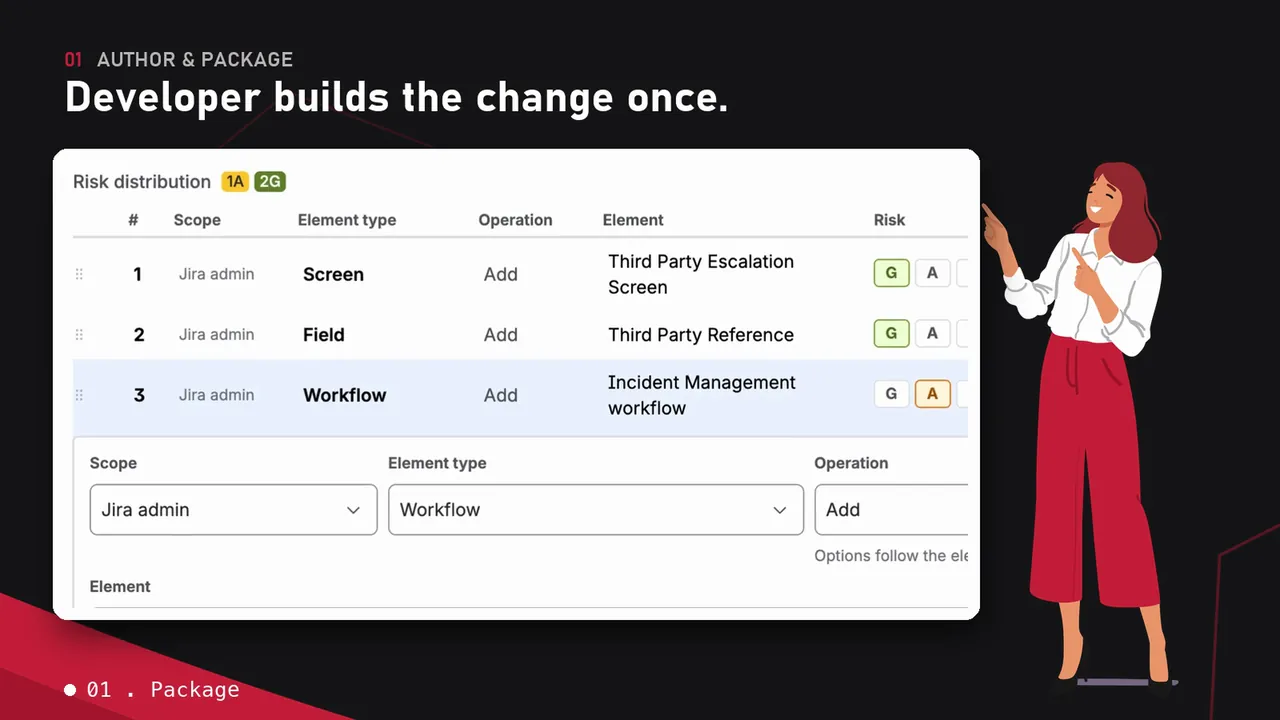
Build it once on the origin site - where changes are authored - and it becomes a formal, versioned change request.

CR-2026-119 · 3 steps · 1 packaged workflow
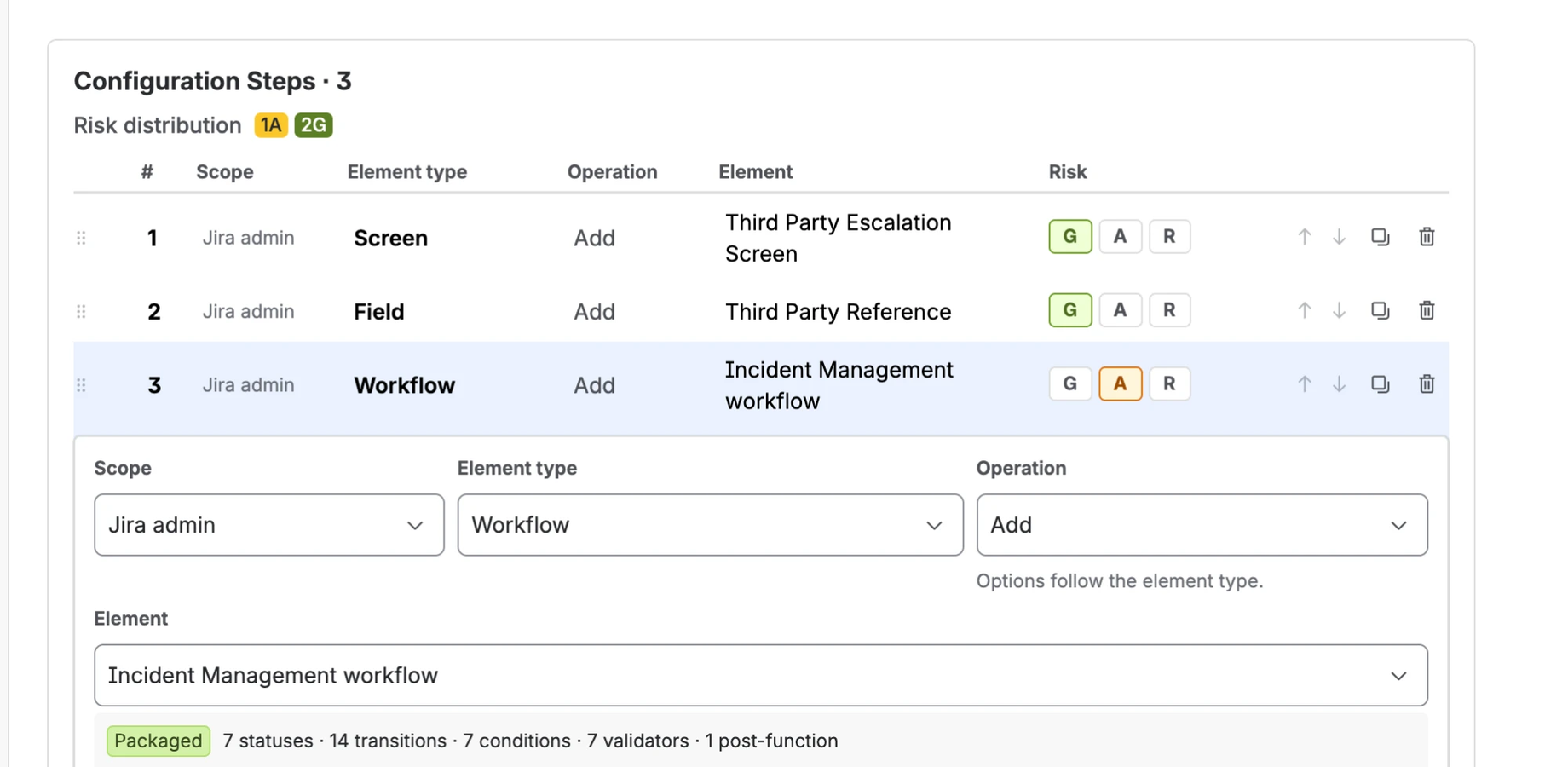
Configuration Steps grid of a change request: three steps - a screen, a field and the Incident Management workflow - each with its own risk rating, the workflow expanded to show it is packaged with 7 statuses, 14 transitions, 7 conditions, 7 validators and 1 post-function.
A screen, a field and the packaged workflow that uses them, each with its own risk rating.
Step 2

Pre-flight it, read-only

A read-only check against the target site. Every finding must be decided before the change can pass.

4 findings · every one needs a decision · pass blocked until then
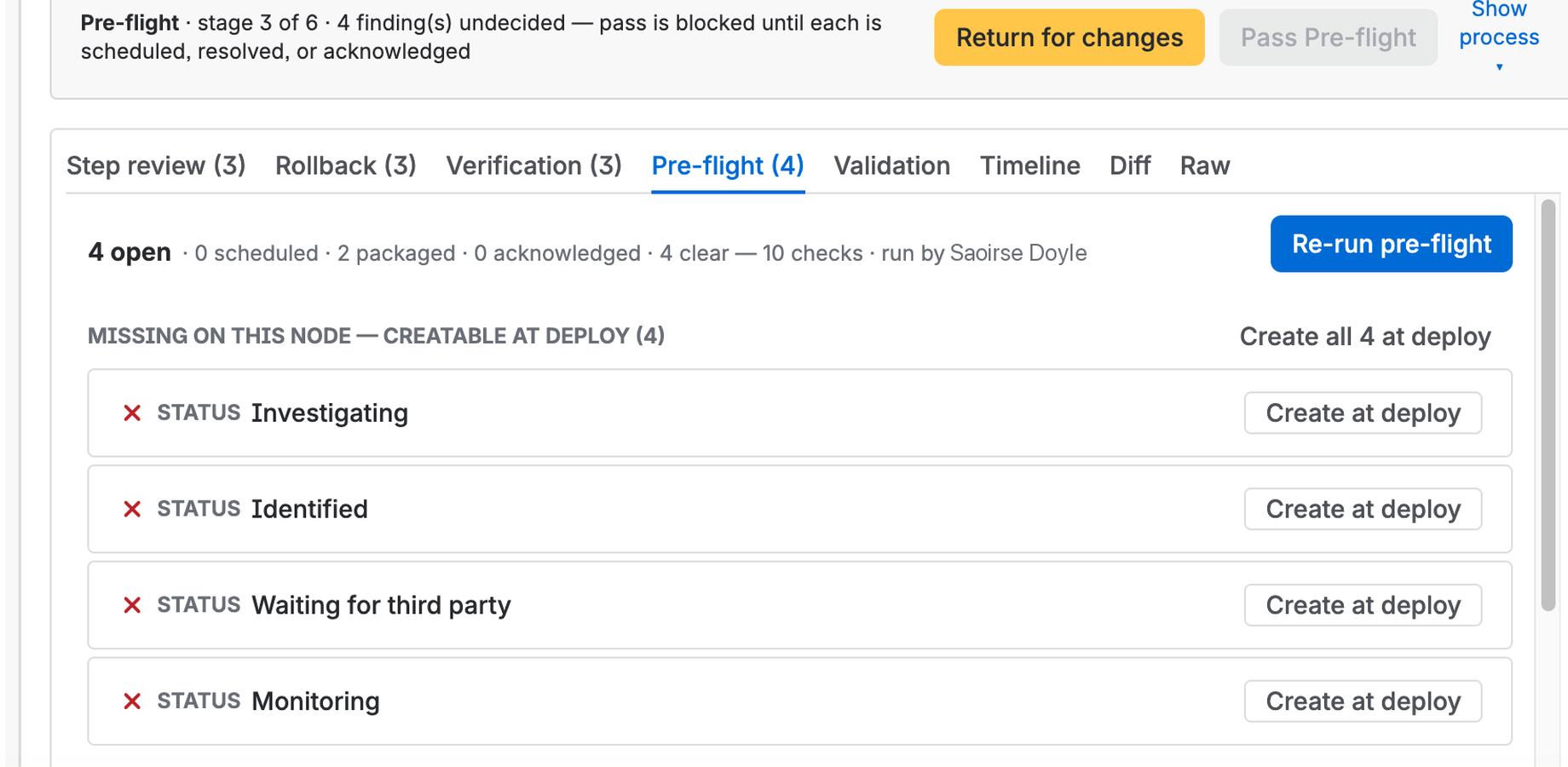
Pre-flight tab: four statuses missing on the target site, each offered Create at deploy, with Pass Pre-flight disabled until every finding is scheduled, resolved or acknowledged.
Nothing is written to the target yet.
Step 3

Approve the whole plan

The approver sees the complete decision set, and can return it with a note.

AWAITING_CAB → APPROVED
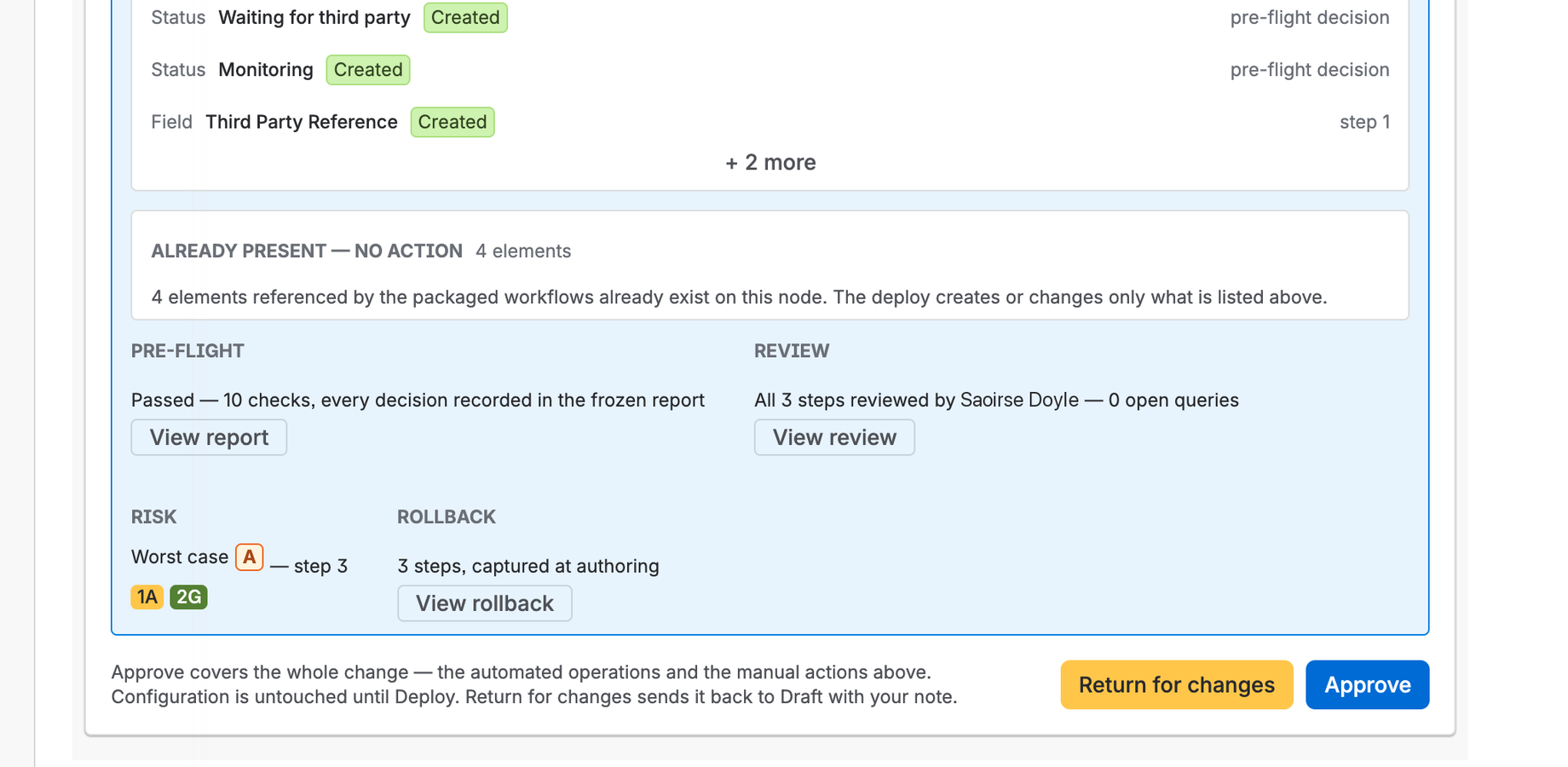
Approval stage of a change request: the statuses and field to be created at deploy, the pre-flight passed with every decision recorded in the frozen report, all three steps reviewed with no open queries, the worst-case risk and the captured rollback, with Approve and Return for changes offered together.
Pre-flight, review, risk and rollback in one view, before the sign-off.
Step 4

Deploy exactly that

Approval covers the whole plan, and the deploy executes it in dependency order.

statuses → field → screen → workflow
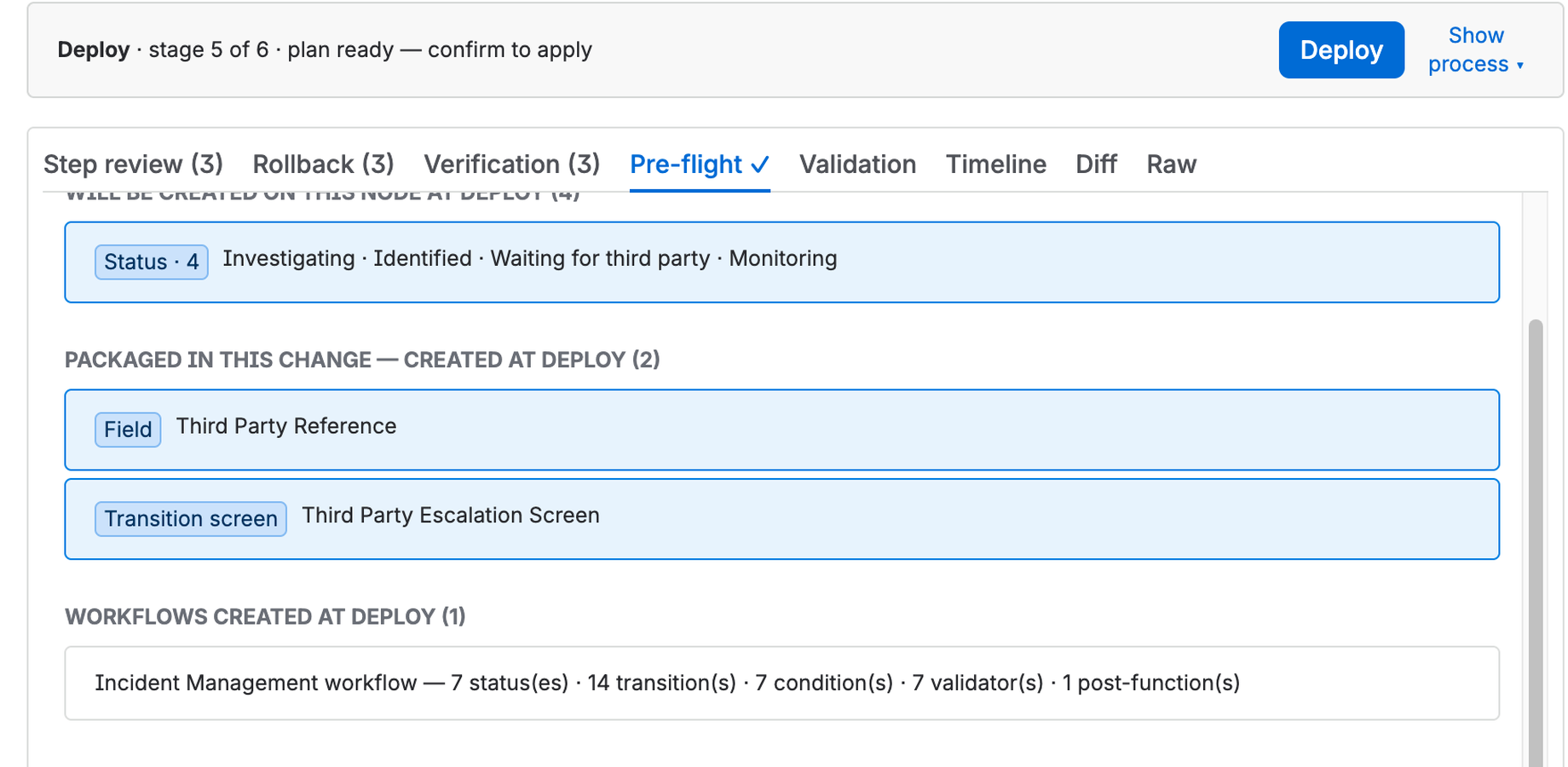
Deploy stage of the change request, plan ready to apply: four statuses to be created on the target, then the packaged field and transition screen, then the Incident Management workflow with its 7 statuses, 14 transitions, 7 conditions, 7 validators and 1 post-function. Nothing happens until Deploy is confirmed.
Missing statuses first, then the field and screen, then the workflow that uses them.
Step 5

Verify & audit

The change ends in an explicit outcome, and the report is committed to a repository you own.
changes/CR-2026-119/ - the change's own history
badbc42[CR-2026-119] state: SCOPING -> SUBMITTED9d64dba[CR-2026-119] step review recorded (3 reviewed, 0 queried, 0 rejected)8130832[CR-2026-119] pre-flight run (items outstanding)6c254be[CR-2026-119] pre-flight: 4 creation(s) scheduled at deployd663909[CR-2026-119] state: PRE_FLIGHT -> AWAITING_CAB8770844[CR-2026-119] state: AWAITING_CAB -> APPROVEDb985745[CR-2026-119] state: APPROVED -> SCHEDULED -> DEPLOYED (deploy now)64ab950[CR-2026-119] state: DEPLOYED -> VERIFIED (completed)
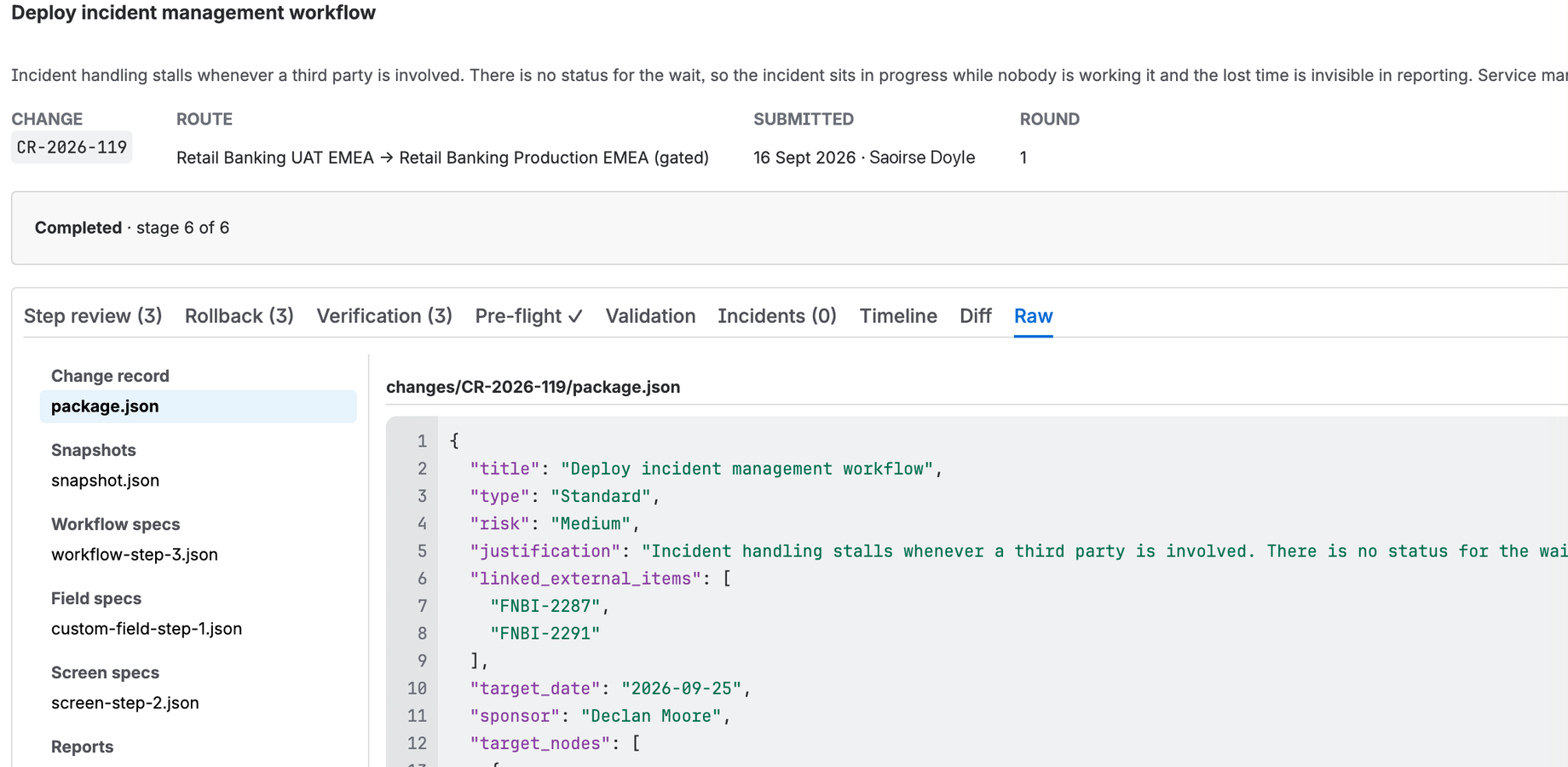
The record of the completed change, stage 6 of 6: the files in its folder - the change record, the snapshot, the workflow, field and screen specs, and the reports - with package.json open beside them.
One folder per change, in plain files, readable without Cardinal Ruler installed.

Each of those steps lands in one folder in a repository your organisation owns.

Book a demo

Built to be inspected

A governance product earns trust with mechanisms, not adjectives. Three of the five below are enforced by Atlassian's platform, your administrator and your Git host rather than by Cardinal Ruler, and each one can be verified independently.

Origin site workflows screens northwind-dev.atlassian.net Your repository Target site workflows screens northwind.atlassian.net Cardinal Ruler isolated Cardinal Ruler isolated capture 01 write 02 read 02 03 deploy 04 05 browser
  1. Enforced by your administrator
    Nothing runs that your admin didn't consent to. Every scope is on the consent screen before you accept.
  2. Enforced by Atlassian
    Configuration can leave to one address only - your repository. Read the manifest: one destination, and that is the list.
  3. Enforced by your Git host
    You own the record, and it outlives the app. Revoke access - every record already written remains.
  4. Enforced by Cardinal Ruler
    Only an approved change is ever deployed. Run a pre-flight, then look at the target: nothing moved.
  5. Enforced by Cardinal Ruler
    Your Git credential never reaches the browser. Open the network tab: no response carries the credential.

Where this fits. Cardinal Ruler is one instrument in your compliance kit: it makes the configuration change process transparent, with a complete, inspectable record for your own organisation - and for whoever audits it. The rest of your posture stays where it always was: with your policies, your controls and your auditors. What the app reads, what it keeps and for how long, what it writes to your repository and why it asks for each Jira permission is set out on the app data handling page.

See a change deploy end to end

Thirty minutes · online · a live deploy, not slides

Cardinal Ruler moves Jira configuration between sites under review: authored on an origin site, checked, then deployed to a target with a record of what changed. A demo walks one real change along that path, so you can see the shape of it against your own setup rather than a feature list.

Cardinal Ruler is on the Atlassian Marketplace. Workflows deploy today, and permission, notification and work type schemes follow in early Q4’26. A demo is the quickest way to tell whether that roadmap lines up with the changes your teams actually ship.

At Team ’26 Europe, 6-8 October? Take the demo in person: Room M6, on the Mezzanine above the expo at RAI Amsterdam. Book a time in Room M6.

The session
Thirty minutes, online. A live deploy rather than a deck, with time at the end for the awkward questions.
What you'll see
One change authored on an origin site, reviewed, deployed to a target, and the record it leaves behind. Real configuration, not a scripted happy path.
Bring your own case
Describe your origin and target setup when you book and the walkthrough follows it, including the parts Cardinal Ruler does not cover yet.

The questions that come up first

Won't another approval layer slow us down?
The gate is set per target site: a site with no approval gate needs only the release manager's own sign-off - one person, one click, still on the record. Pre-flight moves the discovery work before approval, so approving is reading a complete plan, not chairing a meeting. The alternative isn't "no process" - it's the same diligence done invisibly, minus the record.
We already script this with the REST API.
Scripts execute; they don't govern. A script has no review gate, no pre-flight findings anyone must decide, no approval covering what it's about to do, and no record beyond a log line. And the hard part of cross-site work isn't the API calls - it's identifier translation: statuses, fields, and roles carry different IDs on every site. Cardinal Ruler resolves references by name on the target, flags what can't translate, and makes someone decide before anything runs. Keep your scripts for what they're good at; give changes to governed systems a governed path.
Isn't Jira's own history our audit trail?
Jira's audit log records effects inside one site, after the fact. It doesn't capture the proposed change, the review, the approval decision, the pre-flight findings, the deployment plan, or the verification outcome - and it lives inside the very system it audits. Cardinal Ruler's record captures intent through outcome, across origin and target, in a repository your organisation owns: your retention, your jurisdiction, readable without Jira and without Cardinal Ruler.
Atlassian ships Sandbox Configuration Deployment - why this?
For the basic case - moving built-in Jira configuration between one organisation's own linked environments - it's a capable feature, and if that's everything you need, Cardinal Ruler may be unnecessary. It compares two environments, assesses dependencies, pre-validates, and applies the changes you select. It is a different approach, not a worse one: Atlassian applies differences between environments; Cardinal Ruler packages the change as a versioned artefact you review, approve, deploy, and keep. In its Open Beta it runs on Premium and Enterprise plans, and Atlassian's published list of deployed entities covers Atlassian's own configuration, describes no approval step and no rollback, and does not mention configuration belonging to Marketplace apps. Check it against the current release before you decide. If your estate runs on Marketplace apps, needs a formal approval gate, or needs an audit record outside Atlassian's infrastructure - that is where Cardinal Ruler fits.
Can a Forge app be trusted with admin scopes?
Forge is Atlassian's answer to exactly this worry: apps run on Atlassian-operated infrastructure in isolated runtimes, can only call APIs through scopes declared in the manifest and consented to at install, and can only reach the internet through egress destinations declared up front and enforced by the platform. Scope or egress increases are a major version, which is not applied to an existing installation until an administrator approves it; app code never sees user credentials. None of that is Cardinal Ruler's promise to make - it is Atlassian's platform behaviour, documented in the Forge security model, runtime egress permissions and app versions. On top of the platform's guarantees, Cardinal Ruler adds its own: nothing is written to a governed target site that approval did not cover.

That egress declaration is short enough to read in full. For Cardinal Ruler it is one address - your audit repository, and nothing else:

# manifest.yml
permissions:
  scopes:
    …      # every scope, shown to your admin at install
  external:
    fetch:
      backend:
        - address: api.bitbucket.org
Why do we need a Git repository?
Because the audit record has to outlive the app and belong to you. A Git repository keeps every version of the record under your control - your access rules, your retention, your jurisdiction - in plain, diffable files an auditor can read without Jira and without Cardinal Ruler. You provision the repository and grant the app narrowly-scoped access to that repository alone; if you ever leave, the record stays, fully readable. Bitbucket Cloud is the storage adapter at launch; the architecture is Git-host-agnostic, with further adapters on the roadmap.
We're too small for change management.
If you build configuration on a separate origin site, you already do change management - informally, invisibly, and by hand. The simplified governance profile is the default precisely for teams like yours: one short form, one approver if you want one, no calendars, no committees. You get the deploy pipeline and the record without the ceremony; the ceremony is there to grow into, not a price of entry.